Quadratic regression is a statistical method used to model a relationship between variables with a parabolic best-fit curve, rather than a straight line. It's ideal when the data relationship appears curvilinear. The goal is to fit a quadratic equation
y=ax^2+bx+c
to the observed data, providing a nuanced model of the relationship. Contrary to historical or biological connotations, "regression" in this mathematical context refers to advancing our understanding of complex relationships among variables, particularly when data follows a curvilinear pattern.
Working with quadratic regression
These calculations can become quite complex and tedious. We have just gone over a few very detailed formulas, but the truth is that we can handle these calculations with a graphing calculator. This saves us from having to go through so many steps -- but we still must understand the core concepts at play.
Let's try a practice problem that includes quadratic regression. Consider the following set of data: {(-3,7.5),(-2,3),(-1,0.5),(0,1)(1,3),(2,6),(3,14)}
Can we determine the quadratic regression for this set?
Our first step is to enter our x-coordinates and y-coordinates into our graphing calculator. We can then carry out our operation for a quadratic equation. This will give us the equation of the parabola that best approximates the points: y=1.1071x^2+x+0.5714
Great! Now all we need to do is plot our graph. We should be left with something like this:
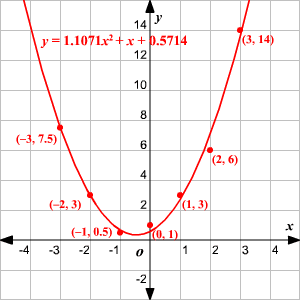
We also know that our relative predictive power ( ) is 0.9942. That's pretty accurate -- and it tells us that our calculations for quadratic regression worked!
##################################################################################
import numpy as np
import matplotlib.pyplot as plt
import pandas as pd
from sklearn.linear_model import LinearRegression
from sklearn.preprocessing import PolynomialFeatures
# Load data from CSV file
data = pd.read_csv('C:/Users/srinu/Downloads/3-4_CSM_ML/Dataset/data1.csv') # Replace 'data.csv' with your file name
# Extract the independent (X) and dependent (Y) variables
x = data['X'].values.reshape(-1, 1)
y = data['Y'].values
# Transform the data to include x^2
poly = PolynomialFeatures(degree=2)
x_poly = poly.fit_transform(x)
# Fit the model
model = LinearRegression()
model.fit(x_poly, y)
# Make predictions
y_pred = model.predict(x_poly)
# Plotting the results
plt.scatter(x, y, color='blue', label='Original data')
plt.plot(x, y_pred, color='red', label='Quadratic regression')
plt.xlabel('X')
plt.ylabel('Y')
plt.title('Quadratic Regression')
plt.legend()
plt.show()
Data Set
X,Y
1,1
2,4
3,9
4,16
5,25
6,36
7,49
8,64
9,81
# importing packages and modules
import pandas as pd
import numpy as np
import matplotlib.pyplot as plt
import seaborn as sns
from sklearn.metrics import r2_score
import scipy.stats as stats
dataset = pd.read_csv('ball.csv')
sns.scatterplot(data=dataset, x='time',
y='height', hue='time')
plt.title('time vs height of the ball')
plt.xlabel('time')
plt.ylabel('height')
plt.show()
# degree 2 polynomial fit or quadratic fit
model = np.poly1d(np.polyfit(dataset['time'],
dataset['height'], 2))
# polynomial line visualization
polyline = np.linspace(0, 10, 100)
plt.scatter(dataset['time'], dataset['height'])
plt.plot(polyline, model(polyline))
plt.show()
print(model)
# r square metric
print(r2_score(dataset['height'],
model(dataset['time'])))

Comments